

Key takeaways
- Best Overall: Lamicall adjustable desk stand
- Best Foldable for Travel: Nulaxy dual folding aluminum stand
- Best for Charging Cable Access: OMOTON C2 with charging cutout
- Best Budget: UGREEN foldable phone stand
- Best for Video Calls: COOPER ChatStand
- Best for Filming and Overhead View: MAGIPEA gooseneck holder
- Best Premium Charging Stand: Anker MagGo 2-in-1 Qi2 stand
The best cell phone holder for a desk depends on how you use your phone while you work, but for most people the Lamicall adjustable desk stand is the best all-rounder: a weighted, foldable metal stand with adjustable height and angle that fits phones with cases. If you want your phone to charge while it sits there, the Anker MagGo 2-in-1 Qi2 charging stand is the runner-up. Below are seven main picks for different desks, from a bargain folding stand to a gooseneck arm for filming, plus a buying guide that explains what actually makes a phone holder stable.
A desk phone stand sounds like a trivial purchase, yet a poor one is a daily annoyance: it wobbles when you tap the screen, tips over with a heavy case or blocks the charging port. The differences are weight in the base, grip on the desk, how far the angle adjusts, and whether the stand fits your phone and case. This guide is research-based. We did not personally use these products, so we compared manufacturer pages, listing details and independent roundups, and we say not listed where a spec could not be confirmed.
Our top picks

![Lamicall Cell Phone Stand for Desk - [Height Angle] Adjustable Phone Holder | Sturdy Desktop Cell Phone Holder, Thick Case Friendly for iPhone Duo/18/17/16/15/14 Pro Max, Galaxy S26, iPad Tablet, 4-10"](https://m.media-amazon.com/images/I/41B6xLJiVNL._SL500_.jpg)

As an Amazon Associate we earn from qualifying purchases at no extra cost to you.
Top Picks at a Glance
- Best Overall: Lamicall adjustable desk stand
- Best Foldable for Travel: Nulaxy dual folding aluminum stand
- Best for Charging Cable Access: OMOTON C2 with charging cutout
- Best Budget: UGREEN foldable phone stand
- Best for Video Calls: COOPER ChatStand
- Best for Filming and Overhead View: MAGIPEA gooseneck holder
- Best Premium Charging Stand: Anker MagGo 2-in-1 Qi2 stand
| Product | Best for | Key specs | Watch for | Price tier |
|---|---|---|---|---|
| Lamicall adjustable desk stand | Daily desk use | Adjustable height and angle, foldable, listed for 4-8 inch devices | Folded size varies by version | Budget |
| Nulaxy dual folding stand | Carrying in a bag | Aluminum, dual folding, cases up to about 18 mm | Joints can loosen over time | Budget |
| OMOTON C2 | Charging while standing | 3 mm aluminum base, charging cutout, non-slip pads | Does not fold flat | Budget |
| UGREEN foldable stand | Lowest cost | Foldable, adjustable | Lightweight base | Budget |
| COOPER ChatStand | Video calls and tablets | 9 to 13 inch adjustable, weighted metal base | Bulky for small desks | Budget |
| MAGIPEA gooseneck holder | Overhead filming and reading | 30-inch flexible arm, clamp mount | Sway at full extension | Budget |
| Anker MagGo 2-in-1 stand | Qi2 phone charging | 15 W Qi2-certified charging stand | Needs a compatible phone and power adapter | Premium |
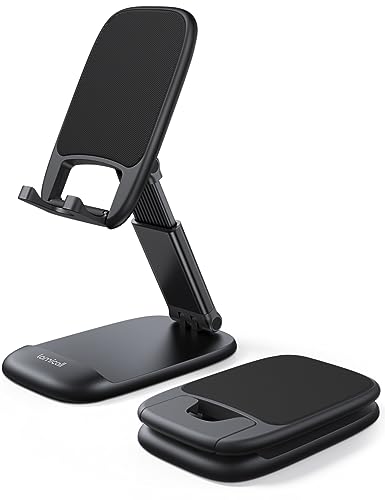
1. Lamicall Adjustable Desk Phone Stand: Best Overall
- Height and angle adjustable (listed up to about 3.2 inches of height)
- Weighted metal base with anti-slip pads
- Fits 4 to 8 inch devices, including many cased phones, small tablets and e-readers
- Foldable for storage
- Charging port stays accessible
Best for: home offices, shared desks and anyone who wants one dependable stand with no gimmicks.
Skip if: you want a very tall stand or one that charges wirelessly.
The Lamicall design is a good example of why metal stands remain popular. The weighted base keeps the phone from tipping when you tap through a screen, and the adjustable arm lets you set the angle so the display is easy to read without leaning forward. The listing says it takes cases up to roughly 0.7 inch thick, which covers most rugged or wallet cases.
Height adjustment up to around 3.2 inches is enough to bring a phone to a comfortable viewing level on a laptop desk or a standing desk. The foldable construction also makes it easy to toss into a laptop bag, although the folded size varies a little across versions.
It is also compatible with small tablets and e-readers up to eight inches, which is a bonus if you read on a mini tablet. Lamicall sells many near-identical stands in different colors, so choose by the dimensions in the listing rather than just the name.
Pros
- Stable weighted base
- Wide device compatibility
- Folds for travel
Cons
- Not as tall as a tripod style
- Many similar variants
2. Nulaxy Dual Folding Aluminum Stand: Best Foldable for Travel
- Full aluminum body with dual folding hinges
- Height and angle adjustable
- Fits cases up to about 18 mm (listing)
- Anti-slip base and pads
- Also works with a Nintendo Switch
Best for: commuters, travelers and anyone who wants a stand that folds almost flat.
Skip if: you want a heavy base that never moves.
The Nulaxy stand has been a staple of budget desk accessories for years. The dual-folding hinge design folds into a small flat shape that disappears into a pocket or laptop sleeve, and it still gives you reliable adjustment when open. Aluminum also keeps the weight low without feeling cheap.
As with all hinge-based stands, the joints can loosen over time. Adjust them slowly and avoid using the stand at the extreme end of its range with a heavy tablet. For phones, it is more than adequate, and the anti-slip pads keep it from sliding.
It comes in several colors, which makes it a popular small gift, and multi-packs are available if you want one for the office and one for home.
Pros
- Folds nearly flat
- Light and sturdy
- Many colors
Cons
- Hinges can loosen
- Light base on slippery desks
3. OMOTON C2: Best for Charging Cable Access
- Aluminum stand with a charging cutout
- 3 mm thick base with non-slip silicone pads
- Works with cases up to about 19 mm
- Angle adjustment up to about 270 degrees (reviewers)
- Does not fold for travel
Best for: people who keep their phone plugged in while working.
Skip if: you need a stand that folds flat.
The cutout at the back is the key feature. Many stands block the bottom of the phone or force you to angle a cable awkwardly, but this design leaves a clear path for a charging cable. It sounds minor until you have tried to charge a phone on a stand that crushes the plug.
The base is thick for its price, which makes the stand heavy enough to resist tipping on a table. The trade-off is that it does not fold, so it is a desk stand rather than a travel stand. Its sturdiness makes it a good choice for kitchen counters and workbenches as well.
Reviewers also like the freedom to tilt the phone to unusual angles, which helps if you use video calls or look at recipes.
Pros
- Clear charging path
- Thick, stable base
- Wide angle range
Cons
- Does not fold
- Bulky footprint
4. UGREEN Foldable Phone Stand: Best Budget
- Fully foldable and adjustable
- Portable design
- Designed for phones and small tablets
- Anti-slip base
- Dimensions and weight: not listed in the store title
Best for: anyone who wants a no-nonsense stand at the lowest cost.
Skip if: you use a very large phone with a heavy case.
UGREEN is better known for chargers and cables, but its simple desk stand follows the same pattern as the rest of the category: foldable arm, rubber pads, adjustable angle. It is an easy choice if you need a stand for a drawer, a guest room or a classroom.
The base is lighter than the weighted designs, so it can slide if you press hard on the screen. A small piece of non-slip shelf liner underneath solves that.
If you need several stands, for example one for each workstation, a budget model like this keeps the cost down.
Pros
- Very low cost
- Foldable
- Trusted accessory brand
Cons
- Lighter base
- Limited angle range
5. COOPER ChatStand: Best for Video Calls
- Adjustable from about 9 to 13 inches
- Weighted, padded metal base
- Tripod-style tabletop design
- Fits iPhone, Android phones and tablets (listing wording)
- Positioned for recording, video calls and FaceTime
Best for: video calls, recording, streaming and reading on a larger phone or tablet at eye level.
Skip if: your desk is small or you want to travel light.
Most flat stands hold the phone at roughly keyboard height, which means you are looking down at the camera. The ChatStand raises the device to 9 to 13 inches, closer to eye level, which is more flattering on video calls and easier on the neck. The weighted base keeps it steady, even with a tablet.
It is bulkier than a folding stand and lives on the desk rather than in a bag. Because the neck adjusts in height, you can drop it low for reading. It is also useful for recording short videos, recipes or hobby projects when you do not want to use a tripod.
Check the clamp size against your device and case before buying, because a very thick case may not fit.
Pros
- Eye-level camera height
- Heavy stable base
- Works with tablets
Cons
- Takes desk space
- Not travel-friendly
6. MAGIPEA Gooseneck Phone Holder: Best for Filming and Overhead View
- 30-inch flexible gooseneck arm
- Clamp mount for desks, headboards and shelves
- Hands-free viewing and overhead recording
- Holds phones in portrait or landscape (typical of the style)
- Clamp thickness limit: not listed
Best for: cooking videos, craft tutorials, sketching and reading in bed.
Skip if: you want a simple stand that sits on the desk without a clamp.
A gooseneck arm solves a different problem from a flat stand: it brings the phone to you. Clamped to the edge of a desk, it can hold the phone over a notebook, keyboard or workbench for overhead recording.
The usual weak point of flexible arms is sway. At the full 30-inch extension, any movement of the desk is amplified, so shorten the arm and position the phone as close as you can. Make sure the clamp fits your desk edge and that you tighten it fully.
It is a very flexible tool for hobbyists and for people who study or work in bed. If you only need a viewing stand on a flat desk, one of the folding models is simpler.
Pros
- Flexible positioning
- Clamp mount frees desk space
- Good for overhead video
Cons
- Sway at full length
- Needs a suitable clamp edge
7. Anker MagGo 2-in-1 Qi2 Charging Stand: Best Premium Charging Stand
- Qi2-certified wireless charging, up to 15 W
- Stand design that holds the phone upright
- Magnetic alignment for Qi2 and MagSafe-compatible phones
- Fast charging for compatible phones
- Power adapter: not listed in the store title
Best for: people with a compatible phone who want a clean desk and no cable plugging every time.
Skip if: your phone does not support Qi2 or magnetic charging.
Wireless stands are the neat upgrade for desks where the phone stays in sight. A Qi2 charger uses magnets to align the phone with the coil, which prevents the misalignment that made older wireless chargers unreliable. The stand angle lets you see notifications and take video calls while it charges.
The name 2-in-1 suggests a second charging surface for another device, such as earbuds or a watch, but check the listing for the exact layout. Charging speed depends on your phone and the power adapter, so make sure you have a suitable one.
If you only want a simple stand, this is overkill. If you charge at your desk every day, the convenience can be worth the cost.
Pros
- Clean, cable-free docking
- Magnetic alignment
- Brand with strong support
Cons
- Needs compatible phone
- Highest price tier here
Also Consider
UGREEN MagFlow 2-in-1 Charging Stand: a lower-cost magnetic wireless stand alternative to the Anker.
INIU Wireless Charger Stand: a 15 W wireless charging station with a sleep-friendly light, as listed.
LISEN Gooseneck Phone Holder: a magic-arm style overhead mount with a clamp for desks.
Lamicall Gooseneck Holder: a flexible arm of about 33 inches for beds and desks.
Stand, Arm or Charger: Which Style Fits Your Desk?
A folding stand is the right answer for most people. It is cheap, light and compatible with almost everything. A weighted stand such as the OMOTON or COOPER is better if you tap the screen a lot or use a tablet. A gooseneck arm is best when you want to move the phone out of the way, for example above a keyboard or over a notebook for filming. A charging stand makes sense if your phone sits on the desk all day and you want it topped up without plugging in cables.
Think about your habits. If you take many video calls, camera height is the main issue. If you read recipes or notes, viewing angle matters. If you use the phone as a second screen for chat apps, a simple stand with good angle adjustment is all you need. And if you use a phone with a thick case, check the case-thickness limit before you buy.
Setting Up Your Desk for Comfort
A phone holder is only part of a comfortable desk. The goal is to put the screen where you can read it without craning your neck. Place the phone slightly to the side of your main monitor, so that a quick glance does not require rotating your whole head. If you use the phone as a second screen for messages or music, angle it so that glare from windows or overhead lights does not wash out the display.
For video calls, place the camera at eye level and about an arm’s length away. A tall stand such as the ChatStand does this naturally. With a flat stand, you can raise the phone with a small box or a stack of books under the stand, as long as the base is stable. Lighting also matters more than hardware: face a window or a lamp rather than sitting with a bright light behind you.
Cable management keeps the setup tidy. A stand with a cutout, or a magnetic charger, avoids bending cables at sharp angles that wear out connectors. If you use a cable, a small adhesive clip on the back edge of the desk keeps the end within reach and stops it falling behind the furniture every time you unplug.
Using Your Phone Stand Beyond the Office
The same stand can work in the kitchen for recipes, on a bedside table as a clock and alarm display, or on a workbench as a reference screen for instructions. Weighted metal stands handle splashes and flour well because you can wipe them clean, and folding stands travel with you to hotel rooms and coworking spaces. A gooseneck with a clamp is useful in a craft room or garage, where table space is limited but there is always a shelf edge to grip.
If you share a desk with someone, consider buying two matching stands. It sounds silly, but a dedicated stand for each person avoids the daily adjustment dance and the risk of a heavy case being forced into a stand that is too narrow. Because most of these models are in the budget tier, owning a couple costs less than a single fancy accessory.
Care and Maintenance
Aluminum stands need almost no maintenance beyond wiping with a damp microfiber cloth. Replace silicone pads if they lose grip, and tighten hinge screws when a stand begins to droop. For gooseneck arms, avoid bending the same spot repeatedly, which can fatigue the metal over time. For wireless chargers, keep the surface free of metal objects and magnets that could interfere with charging, and remove thick cases that block the signal.
How We Chose
We searched a large retail catalog for current desk phone holders and chose models that cover different styles: folding stands, weighted stands, tripod-style stands, gooseneck arms and wireless charging stands. We compared adjustment range, case compatibility, base stability, portability and charging features using manufacturer pages, store listings and independent roundups. This guide is research-based. We did not personally use these products, so we mark unconfirmed details as not listed. We limit each brand to two picks, avoid prices and use tiers instead.
Buying Guide
Base weight and grip
A stable stand starts with a base that does not slide. Look for rubber or silicone pads and a weighted metal base. Cheap plastic stands can tip when you tap the screen. A base around 3 mm of aluminum is a good sign. If the stand slides, a small square of non-slip liner helps.
Case and device compatibility
Check the maximum case thickness, which is usually between 15 and 19 mm for desk stands. Large phones and small tablets need a wider support surface. If you use a folio or wallet case, choose a stand with a wide cradle. Stands that list 4 to 8 inch compatibility cover most phones and mini tablets.
Adjustment range
Angle adjustment lets you tilt the display for reading, while height adjustment brings the phone closer to eye level. If you need both, choose a model with a dual hinge or a telescoping neck. For video calls, higher is better, roughly at eye level.
Charging access
If you charge while using the stand, look for a cutout or an open design that does not block the port. For wireless charging, confirm that your phone supports Qi or Qi2 and that you have a power adapter that meets the charger’s requirement.
Portability
Folding stands pack into a bag, while tripod and weighted designs stay on the desk. If you work in different places, a folding aluminum stand is the right balance.
Common Mistakes to Avoid
- Buying a stand without checking case thickness.
- Choosing a light plastic stand and then tapping the screen heavily.
- Assuming any wireless charger works with any phone.
- Using a gooseneck at full extension and wondering why the video shakes.
- Ignoring the charging port position on stands without a cutout.
Frequently Asked Questions
What is the best cell phone holder for a desk?
For most people, a weighted, adjustable metal stand such as the Lamicall is the best choice. It is stable, works with cases and is inexpensive. If you want charging, add a wireless stand like the Anker MagGo.
How do I stop my phone stand from sliding?
Use a stand with a weighted base and silicone pads, clean the desk surface, and place a small piece of non-slip liner underneath if needed.
Will a phone stand fit a phone with a thick case?
Many stands list a maximum case thickness of roughly 15 to 19 mm. Check the figure on the product page and measure your case before buying.
Is a gooseneck holder better than a stand?
It depends. A gooseneck arm is more flexible and good for filming or reading in bed, but it can sway. A stand is more stable for everyday use on a flat desk.
Can I charge my phone while it is on a stand?
Yes, if the stand leaves the charging port open or has a cutout, or if you use a wireless charging stand. Check that the angle does not strain the cable.
Are wireless charging stands worth it?
If your phone supports Qi or Qi2 charging and you charge at your desk daily, yes. Otherwise a simple stand and a cable are cheaper and just as effective.
What height should a phone stand be for video calls?
Ideally the camera should be near eye level. A stand that raises the phone to about 9 to 13 inches, like the ChatStand, helps reduce neck strain and gives a better angle.
Which One Should You Buy?
Choose the Lamicall if you want a dependable all-rounder. Take the Nulaxy or UGREEN if you want something light and cheap that folds, and the OMOTON C2 if you plug in a cable all day. The COOPER ChatStand is the pick for video calls, the MAGIPEA gooseneck suits filming and reading in bed, and the Anker MagGo is for people who want a charging dock on their desk.
Sources
- Lamicall and Nulaxy manufacturer product pages
- OMOTON and UGREEN manufacturer product pages
- Anker manufacturer page (MagGo Qi2 charging stand)
- Wireless Power Consortium information on Qi2
- Independent phone stand roundups from consumer tech sites
Last updated: October 2026




Write Your Review
No reviews yet. Be the first to share your experience!