

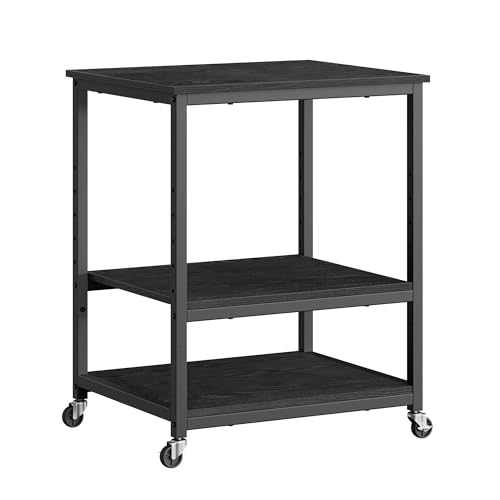
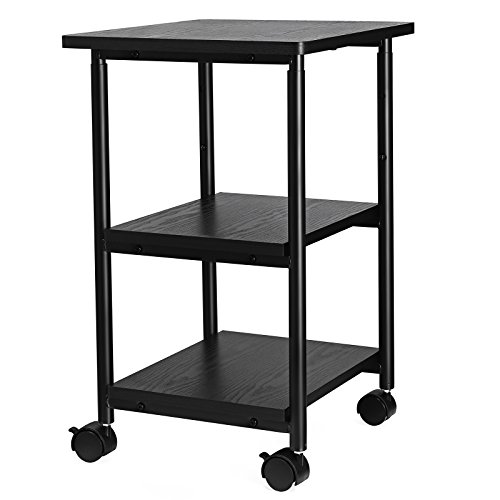
The best printer cart for most home offices is a 2-tier rolling cart with locking casters and a drawer, such as the HUANUO printer stand, because it holds a typical inkjet or laser printer and keeps paper and ink within reach. If you need more shelves, the VASAGLE 2-tier industrial and HOOBRO 3-tier carts add capacity. Measure your printer first: footprint, height and weight decide the cart more than style does.
Our top picks


As an Amazon Associate we earn from qualifying purchases at no extra cost to you.
Quick Comparison of the Best Printer Carts
| Pick | Best for | Key specs | Price range |
|---|---|---|---|
| HUANUO printer stand with drawer | Best overall for home offices | 2 tiers, storage drawer, locking wheels | Budget to mid |
| VASAGLE 2-tier industrial cart | Best look and sturdiness | Industrial wood-and-metal frame, 2 shelves, casters | Mid |
| HOOBRO industrial 3-tier mobile printer table | Best for extra storage and power access | 3 shelves, power outlets and USB ports on some models | Mid |
| Vinsetto mobile printer stand | Best for heavy 3D printers | Holds about 132 lb, lockable wheels | Mid |
| Seville Classics mobile workbench | Best for a workshop printer | Steel frame, drawer, work surface, larger footprint | Premium |
| Basic 3-tier utility cart | Best budget | Plastic or metal shelves, four casters | Budget |
Best Overall: HUANUO Printer Stand with Storage Drawer
A roundup from Print-Technology lists the HUANUO as its best overall pick for home offices. It is a 2-tier rolling stand with a storage drawer and locking wheels, which is the combination most people want: a top surface for the printer and a lower shelf for paper reams.
The trade-off is size. Check the shelf depth and width against your printer, because an all-in-one with a flatbed scanner can overhang a compact stand. Per the maker’s spec sheet, always confirm the weight rating before loading it.
Best Look and Sturdiness: VASAGLE 2-Tier Industrial Cart
The VASAGLE cart pairs a metal frame with wood-look shelves and works well in a living room or small office where appearance matters. The frame style resists wobble more than thin tube designs. The downside is that it takes more room than a basic stand and the assembly requires care so the frame is square.
Best for Extra Storage: HOOBRO 3-Tier Mobile Printer Table
HOOBRO’s industrial 3-tier cart is also in the Print-Technology list. The extra shelf holds paper, toner or ink, and some versions include power outlets and USB ports, which reduces cable clutter. The caveat is that a taller cart can feel top-heavy if the top shelf carries a heavy laser printer, so keep heavy items on the lowest shelf.
Best for Heavy Printers: Vinsetto Mobile Printer Stand
3dprintgearlab picked Vinsetto as its best overall stand for 3D printers, and it lists a load capacity of about 132 pounds. That makes it a fit for large laser printers and desktop 3D printers. Lockable wheels matter here, because vibration from a 3D printer can move an unlocked cart.
Best for Workshops: Seville Classics Mobile Workbench
Seville Classics sells mobile workbenches with drawers and a work surface, such as the UltraGraphite model that measures about 48 by 24 by 37 inches. It is more than most offices need, but it makes sense for a print shop or workshop where the printer shares space with tools. Note that only some casters may lock on certain models, so check before ordering.
Best Budget: Basic 3-Tier Utility Cart
A simple 3-tier cart works if you only want mobility. Shelves are often plastic or light metal, and weight ratings are lower. Use it for a light inkjet and avoid stacking heavy reams on the top shelf. Wheels can wobble on thick carpet.
Printer Cart Size and Weight: A Worked Example
Suppose your laser printer measures 16 by 15 inches and weighs 25 pounds. Add 10 pounds for paper and 5 for toner or ink. That is 40 pounds. A cart shelf should have at least 3 inches of space beyond the printer on each side for ventilation. The shelf should measure at least 20 by 18 inches, and the cart should be rated to at least 60 pounds for a safety margin.
| Printer type | Typical weight | Suggested cart rating | Shelf depth needed |
|---|---|---|---|
| Compact inkjet | 10 to 15 lb | 30 lb or more | 14 to 16 in |
| All-in-one inkjet | 15 to 25 lb | 50 lb or more | 16 to 18 in |
| Laser printer | 25 to 50 lb | 75 lb or more | 18 to 20 in |
| Desktop 3D printer | 15 to 60 lb | 100 lb or more | 20 to 24 in |
These figures are typical ranges. Check your printer’s manual for exact dimensions.
How to Choose a Printer Cart
- Measure the printer. Include open paper trays and scanner lids.
- Check the weight rating. Choose a cart rated at least 50% above the total weight.
- Prefer locking casters. At least two should lock; four is better.
- Consider cable management. Look for cutouts or outlet strips.
- Think about ventilation. Leave space around the printer to avoid heat build-up.
Ownership Realities and Common Mistakes
Casters and screws loosen with rolling, so retighten hardware every few months. Plastic shelves can sag if overloaded. Common mistakes include buying a cart that is too shallow, ignoring the drawer clearance, and placing a vibrating printer on unlocked wheels. If the floor is uneven, adjustable feet help.
Frequently Asked Questions
What size printer cart do I need?
Choose a cart whose top shelf is at least 3 inches wider and deeper than your printer. Check the opened tray size as well. A cart rated above your printer plus supplies is safer.
Can a printer cart hold a 3D printer?
Yes, if the weight rating covers it. Vinsetto lists about 132 pounds for its stand. Use locking wheels and keep the cart on a flat floor.
Do printer carts need locking wheels?
Yes, locking wheels prevent drift while printing and when you load paper. Look for at least two that lock.
Is a utility cart good for a printer?
It can work for light printers. A utility cart usually has lower weight ratings and open shelves, so check capacity and shelf size.
Where should I put a printer cart?
Place it near an outlet and keep a few inches of space for airflow. Avoid humid or dusty spots. Make sure cables are not pulled when the cart moves.






Write Your Review
No reviews yet. Be the first to share your experience!